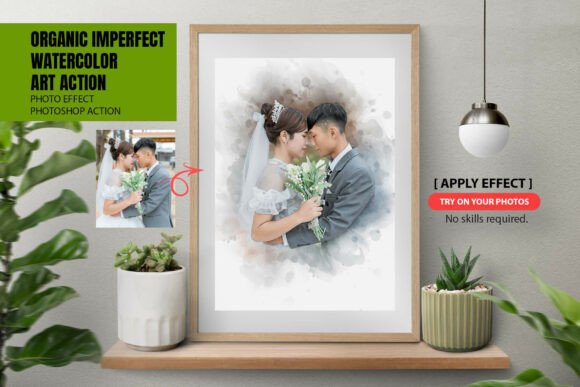
Organic Imperfect Watercolor Action: Achieving Authentic Hand-Painted Results in Photoshop
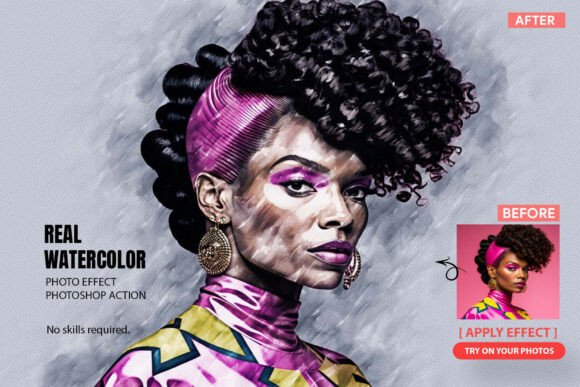
In the current landscape of digital imaging, there is a growing fatigue surrounding artificial perfection. While AI-generated filters and automated smoothing tools have their place, they often strip photographs of their soul, leaving behind a sterile, plastic aesthetic that lacks emotional resonance. For photographers, designers, and artists seeking to reintroduce humanity into their digital workflows, the Organic Imperfect Watercolor Action offers a distinct alternative. This tool is not designed to create flawless symmetry; rather, it is meticulously engineered to replicate the beautiful chaos of traditional media. By embracing messy splatters, uneven brush strokes, and genuine paper textures, this Photoshop action bridges the gap between digital convenience and analog authenticity.
Moving Beyond the Artificial Filter Aesthetic
The primary challenge for modern creatives is distinguishing their work in a saturated market. Standard digital filters apply uniform effects across an entire image, often ignoring the nuanced lighting and color relationships that make a photograph unique. When a wedding portrait or a lifestyle shot is processed through a generic filter, the result can feel manufactured. The goal for many professionals is to achieve a high-end, hand-painted look without spending dozens of hours manually painting over a photograph from scratch.
The Organic Imperfect Watercolor Photoshop Action addresses this specific pain point by prioritizing texture over uniformity. Unlike algorithms that guess at artistic interpretation, this action utilizes real-world assets to transform photography. It preserves the original color integrity of your image while blending it into a professional artistic layout. This approach ensures that a photo of a pet, such as a golden retriever in natural light, retains its recognizable features and true colors, but is presented with the softness and tactile quality of a physical watercolor painting. The "imperfection" is the feature, not a bug, providing a visual warmth that digital-only tools rarely achieve.
What Makes the Workflow Truly Organic
To understand why this tool produces superior artistic results, one must look at what is included in the creative toolkit. A true watercolor effect cannot be achieved with code alone; it requires sampled elements from real art supplies. The download package includes three critical components that work in unison:
- Photoshop Action (ATN File): This is the core engine that automates the complex layering process. It handles the heavy lifting of masking, blending, and applying effects in seconds, but it serves only as the foundation.
- Custom Watercolor Brushes (ABR File): These are not standard digital brushes. They are sampled from real paint applications to create organic edges that bleed and fade naturally, avoiding the hard lines typical of vector-based effects.
- High-Resolution Paper Textures (PAT File): Watercolor is defined as much by the paper as the paint. These patterns introduce grain, tooth, and absorbency variations that interact with the color layers to simulate physical media.
This combination ensures that every time you run the action, the interplay between texture and color is slightly different, mimicking the unpredictability of real watercolor painting. Furthermore, the inclusion of a comprehensive video tutorial and written help file ensures that users can navigate these professional assets regardless of their prior experience level.
Practical Applications for Different Creative Niches
The versatility of the Organic Imperfect Watercolor Action allows it to serve various audiences, each with unique objectives. Understanding how different users approach this tool can help you maximize its potential for your specific needs.
Wedding and Portrait Photographers
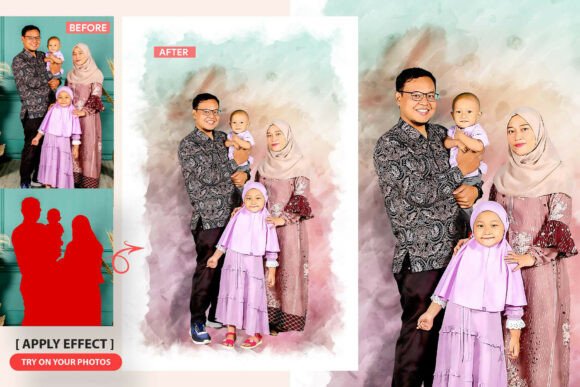
For wedding photographers, the objective is often to create timeless, romantic imagery that stands apart from standard editorial edits. This action is particularly effective for creating album covers, wall art prints, or thank-you cards. The soft, bleeding edges of the watercolor effect complement the emotional nature of wedding photography. Because the action preserves real colors, skin tones remain natural and flattering, avoiding the oversaturated or desaturated extremes common in lesser presets. The result is a painterly interpretation of a cherished memory that feels bespoke and high-value.
Pet and Wildlife Artists
Pet photography presents unique challenges regarding fur texture and dynamic movement. As seen in examples like the watercolor pet dog painting, this action excels at translating the chaotic energy of animals into art. The organic splatters and loose brushwork mirror the playful nature of pets, turning a standard snapshot into a stylized illustration. For artists selling pet portraits, this tool drastically reduces production time while maintaining a handcrafted appearance that clients associate with premium custom artwork.
Graphic Designers and Marketers
In commercial design, standing out requires texture. Flat design has dominated for years, but there is a resurgence of tactile aesthetics in branding and social media. Designers can use this action to create unique backgrounds, blog headers, or product mockups that feel human-made. The ability to customize every element means a designer can match the watercolor intensity to brand guidelines, ensuring consistency without sacrificing the organic feel.
Customization: The Key to Professional Results
A common misconception about Photoshop actions is that they are rigid, one-size-fits-all solutions. However, the Organic Imperfect Watercolor Action is built on a philosophy of non-destructive editing. This is perhaps its most significant benefit for professional users. Every element generated by the action—splatters, textures, paint strokes, and color adjustments—is placed on its own separate layer.
This fully separated layer structure grants 100% freehand customization. If the automatic application adds too much splatter to a subject's face, you can simply mask it out. If the paper texture is too coarse for a delicate floral shot, you can reduce the opacity or swap the pattern. Additionally, the one-click color replace feature allows for rapid experimentation. You can shift the mood from warm autumnal tones to cool pastels instantly, making it easier to create cohesive series of images for galleries or client presentations.
This level of control transforms the action from a simple filter into a collaborative tool. It handles the tedious technical setup, allowing the artist to focus entirely on creative refinement. Beginners can rely on the default settings for immediate results, while advanced users can deconstruct and rebuild the effect to suit complex compositions.
Implementation Tips for Best Outcomes
To get the most out of this resource, consider the following practical recommendations during implementation:
- Image Selection Matters: Watercolor thrives on contrast and clear subjects. Images with busy backgrounds may become muddy when blended. Select photos with strong focal points and good lighting for the cleanest artistic translation.
- Embrace the Mess: Do not try to clean up every splatter or bleed. The value of this action lies in its imperfections. Over-editing to achieve perfection defeats the purpose of the organic aesthetic.
- Utilize the Video Tutorial: Even if you are proficient in Photoshop, watch the included guide. It demonstrates specific techniques for masking and color replacement that are unique to this action’s layer structure, saving you trial-and-error time.
- Test on Duplicates: Always work on a copy of your original file. While the action is non-destructive, having a pristine backup allows you to restart with fresh eyes if the artistic direction isn't working.
Ultimately, the Organic Imperfect Watercolor Action is more than just a productivity tool; it is a stylistic choice. It represents a return to craftsmanship in a digital age, offering a solution for creatives who refuse to compromise on texture and emotion. Whether you are enhancing a family portrait, designing merchandise, or exploring new artistic avenues, this toolkit provides the authentic foundation needed to create work that feels genuinely hand-painted.