Procreate Lit Up Brush Set: Adding Neon Glow to Digital Lettering and Design
Digital artists often search for tools that bridge the gap between technical precision and organic expression. The Procreate Lit Up Brush Set addresses this specific need by combining two-tone color dynamics with a luminous, lighted aesthetic. Unlike standard brushes that rely solely on opacity or size variation, this bundle of seven brushes introduces a secondary color that emerges based on pen pressure. This mechanic mimics the way light interacts with physical surfaces, making it particularly effective for digital calligraphy, neon signage design, and expressive typography. For creators aged 20 to 50 who manage everything from social media content to client branding, understanding the practical application of these pressure-sensitive tools can significantly streamline the workflow for glowing text effects.
The Mechanics of Pressure-Sensitive Two-Tone Lighting
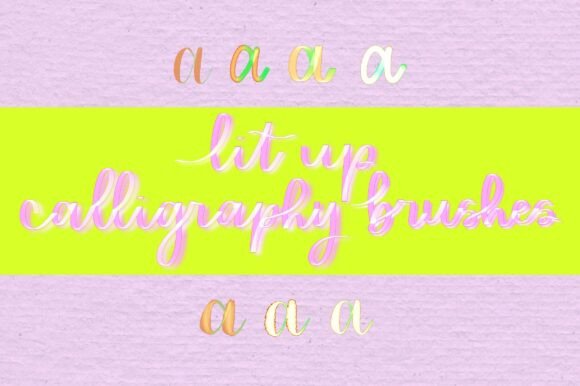
To use the Procreate Lit Up Brush Set effectively, one must understand how it translates hand movement into visual output. The defining feature is the relationship between stylus pressure and color revelation. When you apply light pressure, the brush lays down a base tone, often a darker or muted shade. As you increase pressure, a second, brighter color activates within the same stroke. This creates an immediate highlight without requiring a separate layer or a secondary pass with a blending tool.
For several brushes in this set, pressure also dictates stroke thickness. This dual-response system means that a single downstroke in a calligraphic letterform can transition from a thin, dark entry to a thick, illuminated swell, and back to a thin exit. This replicates the natural behavior of flexible nib pens or brush markers but adds a digital lighting dimension that traditional media cannot achieve. Users should practice varying their pressure rhythmically to master this transition, as inconsistent hand pressure can result in highlights appearing in unintended areas of the letterform.
Commercial Applications for Freelancers and Small Business Owners
Freelance designers and small business owners frequently face tight deadlines when creating promotional assets. The Procreate Lit Up Brush Set serves as a rapid solution for high-impact visuals where time does not permit complex layer masking or external glow filters. Consider a scenario where a local coffee shop needs an Instagram story announcing a new evening menu. Using these brushes, a designer can hand-letter "Night Menu" directly on a dark background, achieving a realistic neon sign effect in minutes rather than hours.
This efficiency extends to logo exploration and mood boarding. When pitching concepts to clients, presenting a polished, glowing typographic treatment can communicate atmosphere more effectively than a flat vector sketch. Because the brushes are raster-based within Procreate, they allow for quick iteration. A marketer can test three different color combinations for a campaign headline during a single brainstorming session, leveraging the two-tone feature to visualize contrast ratios instantly. This capability is invaluable for entrepreneurs managing their own brand identity who need professional-grade aesthetics without hiring a specialist for every asset.
Educational and Hobbyist Use Cases
Beyond commercial work, educators and hobbyists find distinct value in this brush set. Art teachers and workshop facilitators can use the Lit Up brushes to demonstrate contrast and value structure. The automatic highlighting provides immediate visual feedback to students learning about light sources in lettering. Instead of explaining theoretical highlight placement, instructors can show how pressure physically alters the perception of light within a form. This tactile learning approach resonates well with adult learners returning to art or students exploring digital mediums for the first time.
For hobbyists engaged in digital journaling or scrapbooking, these brushes add a festive or dramatic flair to personal projects. Creating birthday cards, holiday greetings, or playlist covers becomes more engaging when the text feels alive. The fun factor of watching colors shift with pressure reduces the intimidation barrier often associated with digital calligraphy. It transforms practice sessions from repetitive drills into exploratory play, which is essential for maintaining long-term interest in skill development.
Strategic Considerations Before Integration
While versatile, the Procreate Lit Up Brush Set requires specific considerations to avoid frustration. First, assess your current hardware. These brushes depend entirely on pressure sensitivity; using them with a non-pressure-sensitive stylus or finger will render only the base color, negating the primary selling point. Ensure your Apple Pencil or compatible third-party stylus is calibrated correctly in Procreate’s settings before starting.
Color selection also demands forethought. The two-tone effect works best when there is sufficient contrast between the base color and the highlight color. Pairing two mid-tone values may result in a muddy appearance rather than a lit-up effect. Users should test color pairings on a separate canvas before committing to a final piece. Additionally, consider the resolution of your workspace. Because these brushes simulate light through texture and color blending, scaling up a low-resolution canvas after the fact can degrade the crispness of the glow. Always set your canvas DPI to at least 300 for print or appropriate pixel dimensions for high-definition screens before beginning.
- Background Dependency: The "lit up" illusion relies heavily on dark backgrounds. On white or light gray canvases, the highlight effect may appear washed out or invisible. Plan your composition around darker negative space.
- Stroke Speed: Rapid strokes may not register pressure transitions smoothly depending on your device's refresh rate. Slower, deliberate movements generally yield cleaner two-tone gradients.
- Layer Management: While the brushes create internal highlights, adding an outer glow often requires a separate Gaussian blur layer beneath the lettering. Treat the brush as the core light source, not necessarily the entire atmospheric effect.
Optimizing Workflow for Digital Calligraphy
Integrating the Procreate Lit Up Brush Set into a regular workflow involves more than just selecting a tool; it requires adapting technique. Digital calligraphers accustomed to monoline or traditional ink brushes must recalibrate their muscle memory. The pressure curve for revealing the second color may differ from the pressure curve used for line weight in other brush sets. Spending ten minutes creating a pressure test strip—drawing lines from light to heavy repeatedly—helps map the specific activation point of the highlight color.
For content creators producing video tutorials or process reels, these brushes offer inherent visual interest. The dynamic color change captures viewer attention and demonstrates skill simultaneously. Filming the creation process with Lit Up brushes can serve as both portfolio content and educational material. Publishers and bloggers covering digital art topics can also utilize screenshots of these brushes to illustrate articles about pressure sensitivity or neon design trends, providing readers with concrete examples of software capabilities.
Ultimately, the value of this seven-brush bundle lies in its ability to merge technical function with creative spontaneity. Whether you are a freelancer rushing to meet a client brief, an educator demonstrating value theory, or a hobbyist enhancing a digital planner, the Procreate Lit Up Brush Set offers a specialized solution for luminous typography. By respecting the mechanical nuances of pressure response and color contrast, users can transform simple letterforms into radiant focal points that elevate both personal and professional digital projects.