Artist Paint Brushes Splash SVG: Integrating Grunge Aesthetics into Creative Workflows
In the realm of digital design and physical crafting, asset selection is rarely just about aesthetics; it is a strategic decision that impacts production efficiency and final product quality. The Artist Paint Brushes Splash SVG serves as more than a decorative element. It functions as a versatile visual anchor for projects requiring an organic, expressive texture within a structured digital environment. For creators, educators, and small business owners, understanding how to leverage this specific type of distressed graphic can streamline the transition from concept to tangible output.
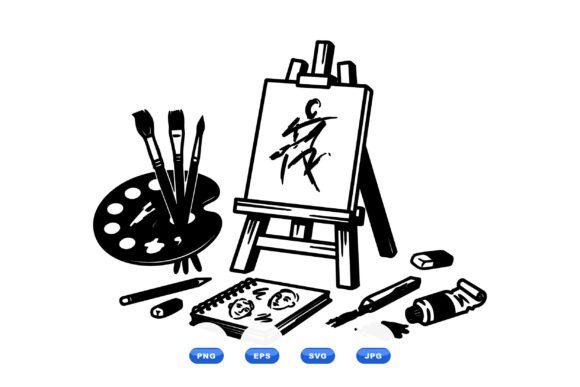
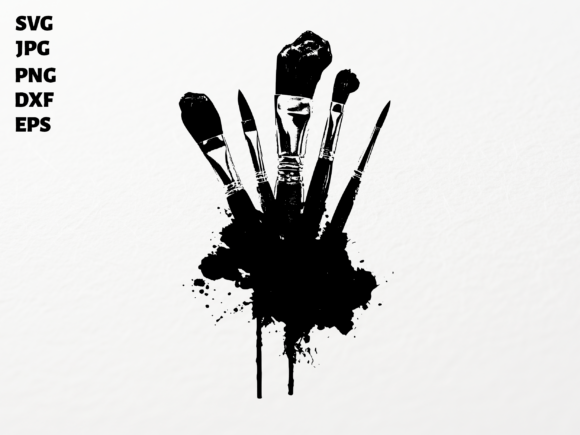
This design features a dynamic arrangement of paint brushes emerging from a vibrant black ink splash, rendered with a grunge aesthetic that mimics traditional media. Unlike clean vector lines, this distressed style introduces controlled chaos, making it ideal for bridging the gap between digital precision and handcrafted authenticity. Whether you are managing a print-on-demand business, organizing art education materials, or developing personal creative projects, integrating this asset requires attention to file formats, software compatibility, and application-specific preparation.
Technical Specifications and Format Compatibility
Efficient workflow begins with selecting the correct file format for your specific hardware and software ecosystem. This asset package provides five distinct formats, each serving a unique function in the production pipeline. Understanding these distinctions prevents compatibility errors and reduces time spent on file conversion.
- SVG (Scalable Vector Graphics): The primary format for Cricut Design Space and Silhouette Designer Edition. Because it is vector-based, it scales infinitely without pixelation. This is essential for vinyl cutting, where node paths dictate blade movement. The SVG format preserves the intricate edges of the ink splash, ensuring clean cuts even at large sizes.
- PNG (Portable Network Graphics): Provided at 300 DPI with a transparent background. This resolution is the industry standard for sublimation printing and direct-to-garment (DTG) applications. The transparency allows for seamless layering over colored backgrounds or textured surfaces without requiring manual masking in post-production.
- DXF (Drawing Exchange Format): Specifically included for users of the Silhouette Basic Edition. This format ensures that users without premium software subscriptions can still access vector cut lines. Note that DXF files may sometimes separate layers upon import, requiring regrouping before cutting.
- EPS (Encapsulated PostScript): The professional standard for Adobe Illustrator and CorelDraw. Use this format when the design requires significant modification, such as recoloring individual brush elements or integrating the splash into complex commercial branding layouts. EPS retains editable vector nodes for maximum flexibility.
- JPG (Joint Photographic Experts Group): A high-resolution raster image best suited for mockups, digital proofs, or reference imagery. While not suitable for cutting or professional printing due to its lack of transparency and compression artifacts, it serves as a quick visual placeholder during the planning phase.
Pre-Production Planning and Asset Preparation
Before initiating any cut or print job, proper asset preparation is critical. The grunge nature of the Artist Paint Brushes Splash SVG presents unique considerations compared to solid-fill graphics. Distressed textures contain numerous small anchor points and negative spaces that can challenge both cutting machines and printers.
For vinyl applications, evaluate the complexity of the ink splatter edges. If the design includes extremely fine details, consider using a higher tack transfer tape or adjusting the blade depth to prevent tearing. In some cases, simplifying the vector path within your cutting software can improve machine performance without sacrificing visual integrity. Most cutting software includes a "simplify" or "smooth" function that reduces node count while maintaining the overall shape.
For sublimation and printing workflows, color management is paramount. The vibrant black ink splash relies on contrast to define the brushes. Ensure your printer profile is calibrated for the specific substrate being used. On dark fabrics, this design works exceptionally well as-is. On light fabrics, verify that the black ink density is sufficient to prevent fading after washing. Because the PNG is provided at 300 DPI, avoid upscaling the image beyond 100% size to maintain edge sharpness.
Application Across Physical and Digital Mediums
The versatility of this graphic lies in its adaptability across different project phases. It functions effectively as a standalone focal point or as a supporting textural element within a larger composition.
Apparel and Merchandise Customization
When designing t-shirts, tote bags, or tumblers, placement dictates impact. The vertical orientation of the paint brushes makes this design naturally suited for center-chest placements on apparel or wrap-around designs on cylindrical drinkware. For entrepreneurs running a print-on-demand store, this asset offers a niche appeal to artists and creatives. Pair the graphic with typography that matches the distressed aesthetic—avoid clean sans-serif fonts that clash with the grunge texture. Instead, opt for hand-lettered styles or textured serifs to create visual cohesion.
Studio Decor and Environmental Branding
Art studios, classrooms, and creative workspaces benefit from environmental cues that reinforce identity. This SVG translates effectively into wall decals, window clings, and framed prints. When used as signage, the ink splash adds energy to otherwise sterile spaces. For educators, this graphic can serve as a visual marker for art supply stations or inspiration boards. The high-resolution PNG allows for large-format printing on canvas or matte paper, creating professional-grade decor at a fraction of the cost of commissioned murals.
Digital Composition and Social Media
In digital workflows, the transparent PNG acts as a non-destructive overlay. Content creators and marketers can use the splash to frame text in social media posts, add texture to website headers, or create branded templates for digital products. The grunge aesthetic performs well on screens because it breaks up flat blocks of color, increasing visual engagement. When using the asset digitally, always retain the original high-resolution master file and create scaled-down copies for web use to optimize load times.
Workflow Integration and Efficiency Strategies
Integrating new assets into an existing workflow should reduce friction, not create it. Organize your digital library systematically. Rename the downloaded files to include descriptive tags such as "PaintBrush_Splash_Grunge_Black.svg" rather than relying on generic filenames. Store the master files in a cloud-synced folder accessible across devices, ensuring you can retrieve the EPS version for desktop editing or the SVG version for mobile cutting app sessions.
Batch processing maximizes efficiency for production runs. If creating multiple items featuring this design, prepare all cut files or print layouts in a single session. For Cricut and Silhouette users, utilize the "Print then Cut" feature for sticker production, combining the ink splash with coordinating text elements on a single mat layout to minimize material waste. For sublimation, gang multiple designs onto a single sheet of transfer paper to optimize press time and ink usage.
Quality control should be built into the process. Always run a test cut or test print when using this design on a new material. The distressed edges of the ink splash interact differently with cardstock versus vinyl versus cotton. Document successful settings—including blade pressure, speed, heat press temperature, and dwell time—in a project log. This reference data eliminates guesswork for future projects and ensures consistency across product lines.
Strategic Considerations for Long-Term Use
Sustainable creative practice involves selecting assets that offer longevity. The Artist Paint Brushes Splash SVG avoids trend-dependent elements like specific year markers or fleeting pop culture references. Its focus on fundamental artistic tools ensures relevance regardless of season. This makes it a reliable staple in a commercial design portfolio or personal craft inventory.
Consider licensing and usage rights when incorporating this asset into products for sale. Verify that the purchase agreement permits commercial use for physical end products. While the graphic itself cannot be resold as a standalone digital file, it can typically be applied to unlimited physical merchandise. Maintaining clear records of asset licenses protects your business from intellectual property disputes and supports ethical design practices.
Finally, view this asset as a component of a broader visual system. It pairs effectively with other art-related graphics, color palettes inspired by traditional pigments, and tactile materials like kraft paper or raw canvas. By treating the Artist Paint Brushes Splash SVG as part of a cohesive design language rather than an isolated novelty, you unlock greater creative potential and operational efficiency. The result is work that feels intentional, professionally executed, and authentically connected to the spirit of artistic expression.